
Clay Alternatives: How We Build Outbound With Claude Code and RevCode
The best Clay alternatives in 2026 fall into four groups: Clay-style table tools, all-in-one data platforms, email waterfall specialists and AI agent builds. For teams that run outbound at scale, the strongest option we have tested is Claude Code paired with RevCode, a local app that gives Claude Code tables, memory and your own API keys.
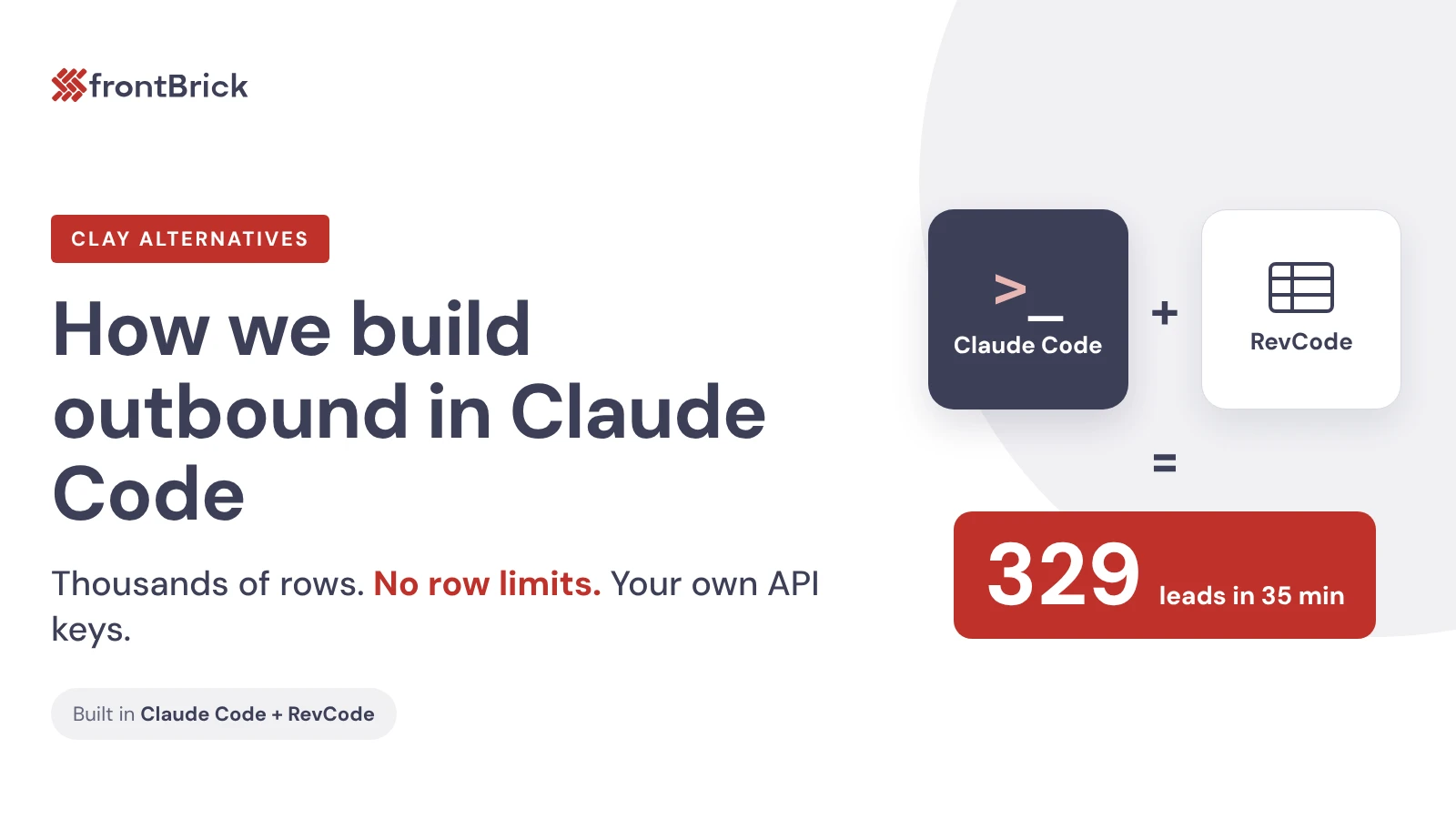
We are a Clay Advanced Artisan Partner and still use Clay every day. But in a recent live build, we built a full campaign in Claude Code in about 35 minutes. Thousands of rows, validated emails and a list uploaded to the sequencer, without touching Clay.
This guide compares the options, then walks through that build step by step so you can copy it.
What are the best Clay alternatives in 2026?
The best Clay alternative depends on what you use Clay for. Most teams use it for one of four jobs: building lists, enriching contacts, finding emails or running custom research at scale. Clay's competitors each tend to win one of those jobs, not all four.
| Type of Clay alternative | Examples | Best for | Main tradeoff |
|---|---|---|---|
| Clay-style table tools | Persana AI, Databar | Teams that like Clay's spreadsheet layout but want a different price or credit model | You still learn a new table tool and its credit rules |
| All-in-one data and sending | Apollo | Small teams that want one contact database plus sequencing | Less control over data sources and custom logic |
| Email waterfall specialists | FullEnrich, BetterContact | Teams that only use Clay to find work emails and phone numbers | No list building, scoring or research |
| AI agent builds | Claude Code with RevCode | Agencies and GTM engineers running many campaigns | You bring your own API keys and need some comfort with a terminal |
If you only need emails, a waterfall tool is the cheapest fix. If you need Clay's flexibility without row limits, an AI agent build is the closest match. That is the path the rest of this guide covers.
Why teams look for a Clay alternative
Teams look for a Clay alternative when credit costs grow faster than pipeline, or when a campaign needs more rows and more custom logic than one table can hold. Clay is not the problem. It is a strong tool, and we still run client work in it every day.
Three things usually push teams to look:
- Cost at volume. If you are an agency or you want outbound that really scales, Clay can get a little bit pricey. The more campaigns you run, the more that matters.
- Row limits. Signal-based builds can pull thousands of rows in one go. We wanted a setup where the number of rows is never the thing that slows a campaign down.
- Context lives somewhere else. Your ICP, call notes and past campaign results sit outside the table. Every new build starts cold.
What is RevCode? A Clay alternative built for Claude Code
RevCode is an app that gives Claude Code a visual workspace for outbound. Live tables sit on one side and your Claude Code terminal sits on the other. You prompt your way into tables and campaigns, and you watch every row and column fill in as the agent works.
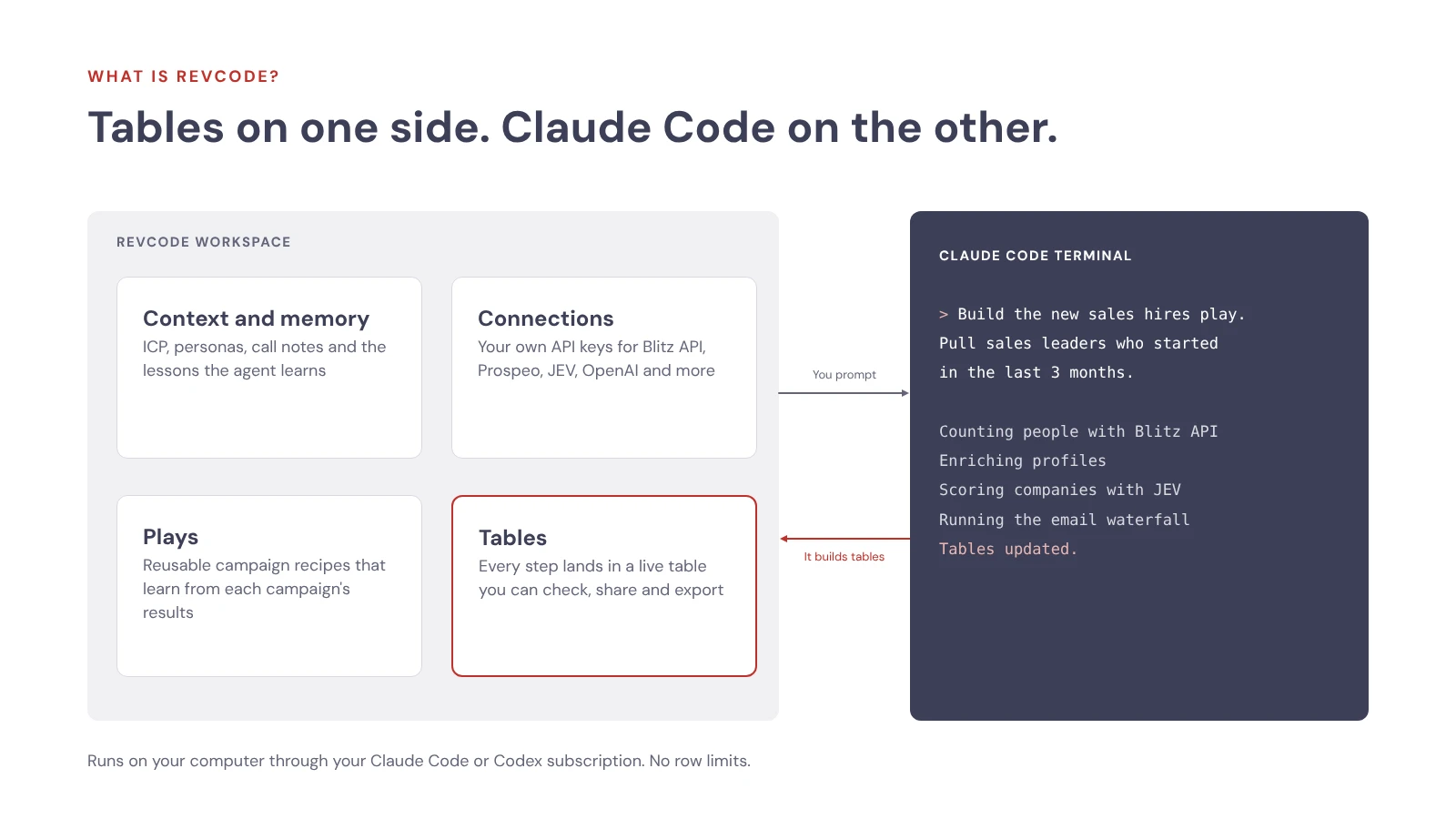
This is what Claude Code for sales looks like in practice. The parts we use most:
| Part | What it does |
|---|---|
| Context and memory | Holds your ICP, personas, services, buying signals, value props, call notes and Slack threads. Memory logs facts the agent learns, like your plan limits, so you do not repeat yourself. |
| Connections | Your own API keys for tools like Blitz API, JEV, Prospeo, BetterContact, OpenAI, Attio and treg. |
| Plays | A reusable campaign recipe: who it is for, the angle, what never to do and the build brief. |
| Tables | Every step of the build lands in a live table you can check, share with your team and export. |
It runs on your computer through your existing Claude Code or Codex subscription, so the agent itself adds no extra AI bill.
Clay vs Claude Code with RevCode
The biggest difference is who does the building. In Clay, you click your way through columns. With Claude Code and RevCode, you describe what you want in plain English and the agent builds it, while you watch every row land in a table.
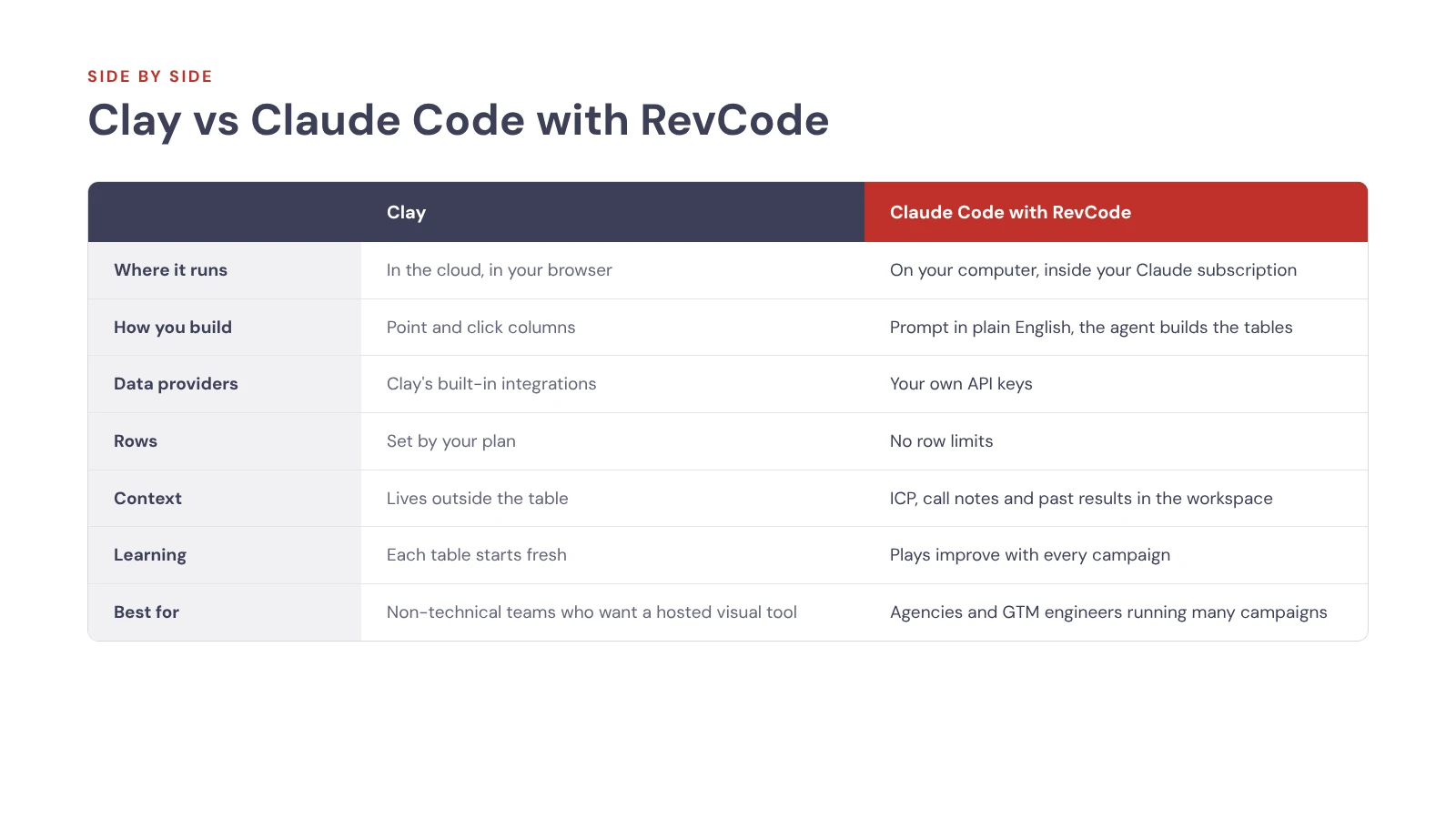
| Clay | Claude Code with RevCode | |
|---|---|---|
| Where it runs | In the cloud, in your browser | On your computer, through your Claude Code or Codex subscription |
| How you build | Point and click columns | Prompt in plain English, the agent builds the tables |
| Data providers | Clay's built-in integrations | Your own API keys (Blitz API, Prospeo, JEV, treg and more) |
| Rows | Set by your plan | No row limits, thousands of rows per build |
| Context | Lives outside the table | ICP, personas, call notes and past results live in the workspace |
| Visibility | Every step shows in the table | Every step shows in a live table beside the terminal |
| Learning | Each table starts fresh | Plays pull in campaign results and improve each run |
| Best for | Non-technical teams who want a hosted visual tool | Agencies and GTM engineers running many campaigns |
The visibility row matters most. A common worry with Claude Code is that the agent works in a terminal, so you never know where a mistake happened. RevCode fixes that. Every step of the build lands in a table you can open, check and share.
How to build an outbound campaign in Claude Code, step by step
You build a campaign in Claude Code in seven steps: load your context, write the play, write the brief, find people, qualify them, find and verify emails, then clean and send. Here is a real campaign we built this way, a "new sales hires" play aimed at sales leaders who just started a new job at a B2B software company.
1. Load your company context
Start by giving the agent everything it needs to know about you. We connected our ICP and personas from Google Drive, our services and social proof from our website, and our 19 B2B buying signals from Notion. Then we asked Claude to map value props, objections and messaging from our sheets.
This takes a few minutes, and every future campaign reuses it.
2. Write the play
A play is a campaign recipe in three parts:
- Who it is for: sales managers, directors, heads of sales, VPs of sales and CROs at smaller companies, who started a new role in the last 3 months.
- The angle: new leaders need pipeline fast. We offer to build a system that drives pipeline from month two.
- What never to do: no people who were promoted internally, and no large companies.
Claude links the right personas from your context automatically, so the play and your ICP stay in sync.
3. Write the build brief
The brief is the step by step plan Claude follows. You can type it or simply talk it through. We used voice dictation to speed this up. A short version of ours:
1. Use Blitz API to count sales leaders at B2B software companies in the US,
   3 months or less in their role. Show me the count first.
2. Pull them, enrich their profiles and find work emails with Blitz API.
3. Enrich companies and use JEV to check: is this a B2B software company?
   Keep companies with up to 250 employees.
4. Check employment history. Keep only new hires, not promotions.
5. Fill missing emails with Prospeo, validate with Bouncer,
   re-check non-deliverable ones with TryKitt.
6. Clean first names and company names with OpenAI.
7. Build a table for every step.
4. Find companies and people
Claude used Blitz API to pull everyone who matched. LinkedIn industries are self-reported, so we told it to search broadly with company keywords instead of strict industry filters. It counted about 992 people who started in the last 3 months and pulled a wider pool of 2,400 to clean up later.
Blitz API runs at 50 requests per second, so enrichment moves fast once you tell the agent your plan limits.
5. Score and qualify
Next, JEV scored each company on a 0 to 1 scale for "is this B2B software". Scores of 0.5 and up passed. We kept companies with up to 250 employees.
Then Claude wrote a formula that compares each person's current and past roles. It flags who is a new hire and who was promoted, and it keeps their previous company, which is a nice detail for the copy.
One tip: tell the agent to run steps in parallel. We asked it to start JEV scoring as soon as Blitz data came back, instead of waiting for every row to finish.
6. Run the email waterfall
Waterfall enrichment tries one email source, then fills the gaps with the next, then checks every result before anything gets sent. Ours runs in this order:
- Blitz API finds the first round of work emails.
- Prospeo fills the gaps.
- Bouncer validates every email. Only "deliverable" passes.
- TryKitt re-checks anything Bouncer did not mark deliverable. Only "valid" passes.
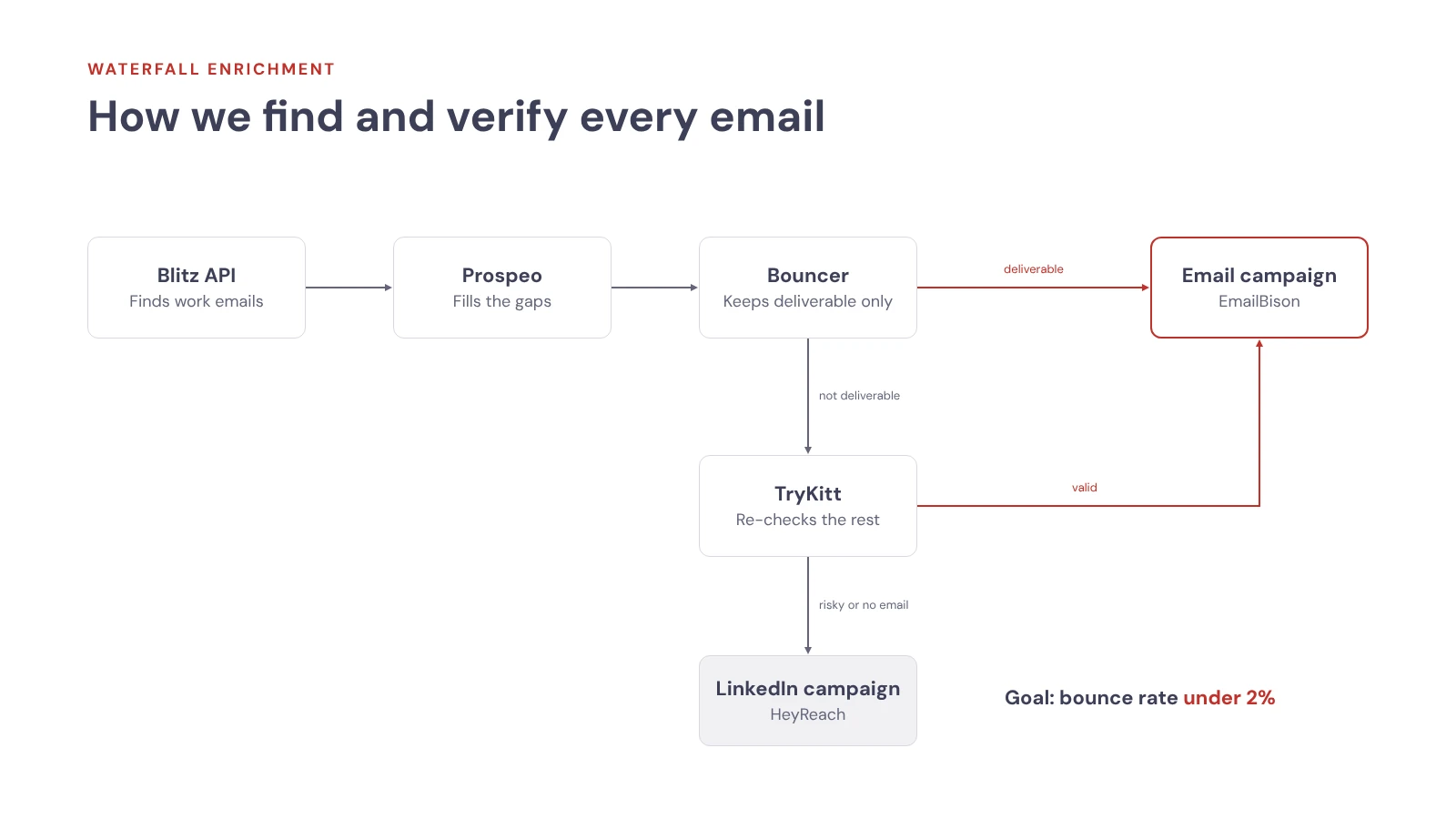
We tested 10 to 15 validators. Bouncer was the most reliable and TryKitt came second. Together they keep our bounce rate below 2%. Anything "risky" is dropped from email.
7. Clean, then send
Last, OpenAI cleans first names and company names so the email reads naturally. "Andrew W." became "Andrew", and "Summit Technology Laboratory" became "Summit Technologies".
Then we told Claude where to send. Leads with valid emails went into a new EmailBison campaign, skipping anyone already in another campaign. Leads without a valid email went into a HeyReach LinkedIn campaign, so nobody is wasted.
What the live build produced
| Step | Result |
|---|---|
| People pulled from Blitz API | 2,400 |
| Started their role in the last 3 months | About 992 |
| Passed every check (B2B software, up to 250 employees, new hire) | 329 |
| Emails found by Blitz API | 190 |
| Emails filled by Prospeo | 139 |
| Time from empty project to list in the sequencer | About 35 minutes |
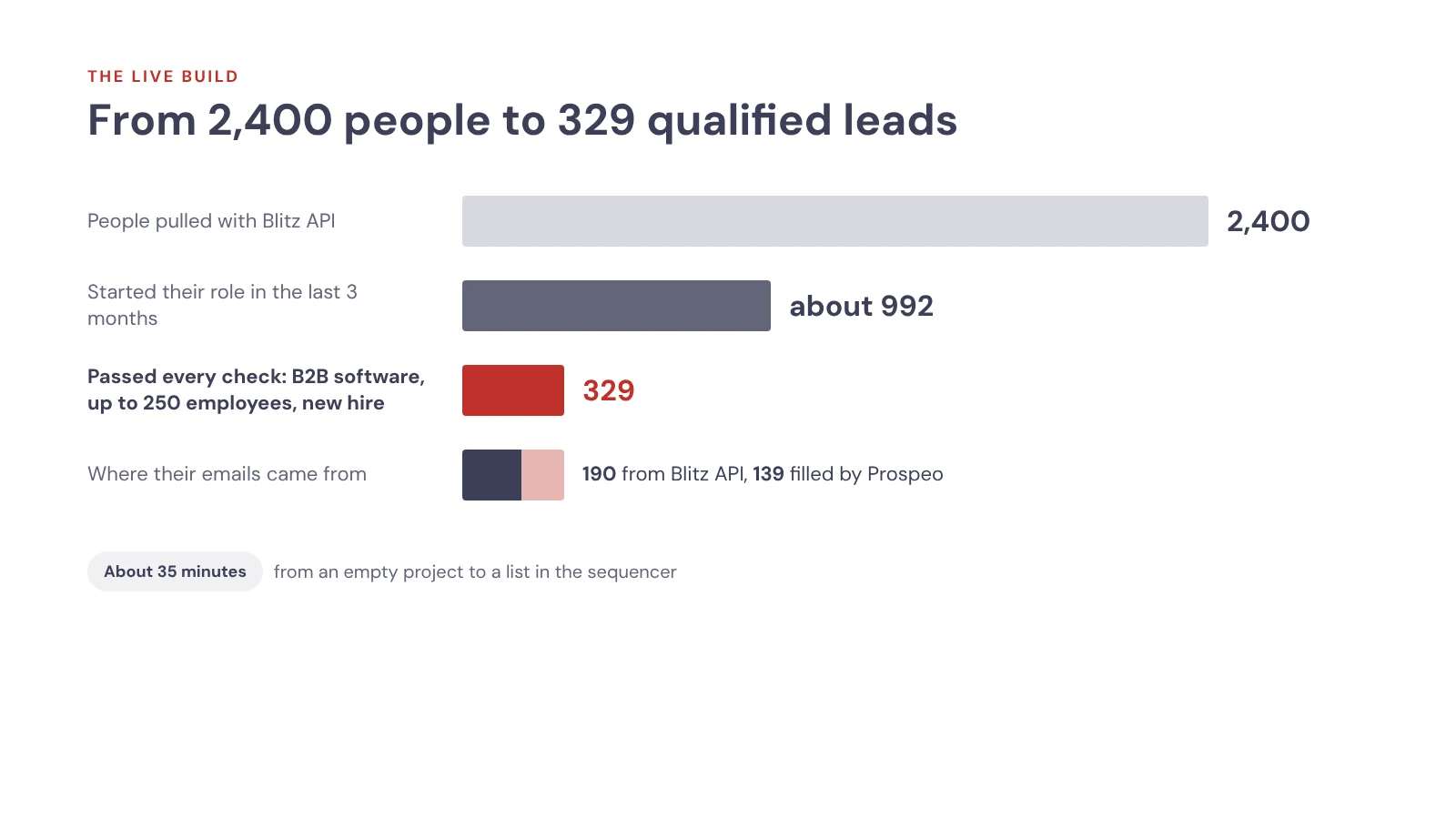
The final list is much smaller than the first pull, and that is the point. Narrow titles, company size and new-hire checks leave you with people who actually fit the offer.
Why the campaigns get better every run
Campaigns built this way get better each time because the results feed back into the play. Connect your sequencer (EmailBison for email, HeyReach for LinkedIn) and each play keeps the results of every campaign built from it. When you build version two, the agent checks what worked and optimizes for the metric you choose, such as positive replies. You do not need to be an outbound expert to get better campaigns each round.
Memory does the same for small details. During our build, the agent noticed we are on an unlimited Blitz API plan. It asked us to confirm, saved it to memory and stopped running enrichment at 1 to 2 requests per second. Next time, it starts at full speed without being told.
This is what makes signal based outbound repeatable. The new sales hires play now holds its build process, the know-how and its own results, so we can run it again every week. RevCode is also adding agents that will run plays on their own, with nobody at the keyboard.
Three habits that make it work even better:
- Keep the context clean. The agent only loads what matters for this client and this play, so its reasoning stays sharp.
- Write the copy where the context lives. Use the same terminal to draft openers based on the signal and to brainstorm the offer.
- Use a second model as a reviewer. If you have both subscriptions, open Codex next to Claude Code to check its work, the same way developers use one model to review another's code.
When Clay is still the better choice
Clay is still the better choice when your team wants a hosted visual tool that anyone can pick up without touching a terminal. We use it every day, and it is the right fit for plenty of teams.
| Pick Clay if | Pick Claude Code with RevCode if |
|---|---|
| Your team is non-technical and prefers point and click | You or your GTM engineer are comfortable prompting in a terminal |
| You want built-in integrations without managing API keys | You already use your own API keys for tools like Blitz API, Prospeo and Bouncer |
| You run a few campaigns a month | You run many campaigns across many clients or segments |
| You want one shared tool the whole team knows | You want context, memory and results to build up across campaigns |
Many GTM engineering teams end up using both: Clay where the team needs a shared visual tool, and Claude Code with RevCode for high-volume builds. If you are weighing outside help for either, our guide on how to evaluate a Clay agency lists the questions to ask.
Watch the full build
See the whole campaign come together, from an empty project to a list in the sequencer.
Watch: Clay Alternative: Claude Code + RevCode = Clay With No Limits
| Time | What you will see |
|---|---|
| 00:00 | Clay with no limits: what you will see |
| 01:12 | What is RevCode? A Clay alternative for Claude Code |
| 03:57 | How to load your company context |
| 08:34 | How to write the outbound play |
| 11:27 | Live build: find, enrich and validate leads |
| 23:29 | The final list: email waterfall and upload |
| 27:11 | Want this built for you? |
Frequently asked questions
Is Claude Code a good alternative to Clay?
Yes, if you are comfortable prompting an AI agent. On its own, Claude Code works in a terminal, so it is hard to see each step. Paired with RevCode, every step lands in a live table, and we built a full campaign with 329 qualified leads in about 35 minutes.
Is there a cheaper alternative to Clay?
There can be, depending on what you use Clay for. If you only need work emails, a dedicated email waterfall tool costs less than a full platform. If you need full list building and research, Claude Code with RevCode keeps costs down because it runs inside the Claude subscription you already pay for, with your own API keys and no row limits.
How do I keep my cold email bounce rate under 2%?
Validate every email before it goes into a sequence. We run every email through Bouncer and keep only "deliverable" results. Anything else gets a second check with TryKitt, and only "valid" emails stay. Risky emails are dropped, and those leads go to a LinkedIn campaign instead.
Do I need to know how to code to use Claude Code for outbound?
No. You write your play and build brief in plain English, or simply talk them through, and Claude builds the tables and formulas. You do need to be comfortable working in a terminal and connecting your own API keys.
What is waterfall enrichment?
Waterfall enrichment checks several data sources in order until it finds what you need. In our build, Blitz API looks for a work email first and Prospeo fills the gaps. Every result is then validated before anything gets sent.
Clay vs Apollo: which should I use?
They solve different problems. Apollo is a contact database with sequencing built in. Clay is a workflow tool that pulls data from many providers into one table. Small teams that just need contacts and sending often start with Apollo, while teams that need custom research and scoring use Clay or an AI agent build.
How do I find newly hired sales leaders for outbound?
Filter a people data source by sales titles and time in role. We used Blitz API to find sales leaders at B2B software companies who started in the last 3 months. Then we checked each person's employment history to keep new hires and drop internal promotions.
Want this built for your team?
We implement and manage campaigns like this for our clients. Learn more about our fractional GTM engineering and Clay consulting work. On a short call, we look at your current setup, find the gaps and show you where more pipeline can come from.

What Is a GTM Engineer? Role, Skills and When to Hire One
What a GTM engineer does, the skills to hire for, and when to hire full time vs fractional.
 Stan Stojanovic

How to Evaluate a Clay Agency: 5 Questions to Ask
Evaluate a Clay agency with five practical questions on strategy, workflows, certification, ownership and AI agents. Includes a partner checklist.
Stan Stojanovic
11 Best Clay Agencies in 2026: Pricing, Proof and Fit
Compare the 11 Clay agencies buyers shortlist most in 2026, with delivery model, published pricing, attributed proof and who each firm fits.
Stan Stojanovic
9 Best GTM Engineering Agencies in 2026: Pricing, Proof and Fit
Compare 9 GTM engineering agencies in 2026 on what each builds, published pricing, attributed proof and what you keep when the engagement ends.
Stan Stojanovic
10 Best Go to Market Consulting Firms in 2026: Pricing, Proof and Fit
Compare 10 go to market consulting firms in 2026 on what each one delivers, published pricing, attributed proof and which B2B teams each firm fits.
Stan Stojanovic
Clay Lead Generation: Automate Outbound with Grok Bot
A practical Clay + Grok Bot workflow for finding companies, qualifying decision-makers, personalizing outreach, and reviewing interested replies.
Stan Stojanovic
B2B Data Enrichment with Clay: A Practical Workflow
Build useful B2B records with Clay: qualify accounts, research evidence, validate contact data, control costs, and evaluate implementation partners.
 Petar Stojadinovic
AI Search Optimization: The GTM Engineering Workflow That Grew Our AI Visibility 4,000%
How we run AI search optimization with an AI agent: 30 buyer prompts checked daily, drafted content, listicle outreach and a human approving every step.
 Jovana Stojanović