
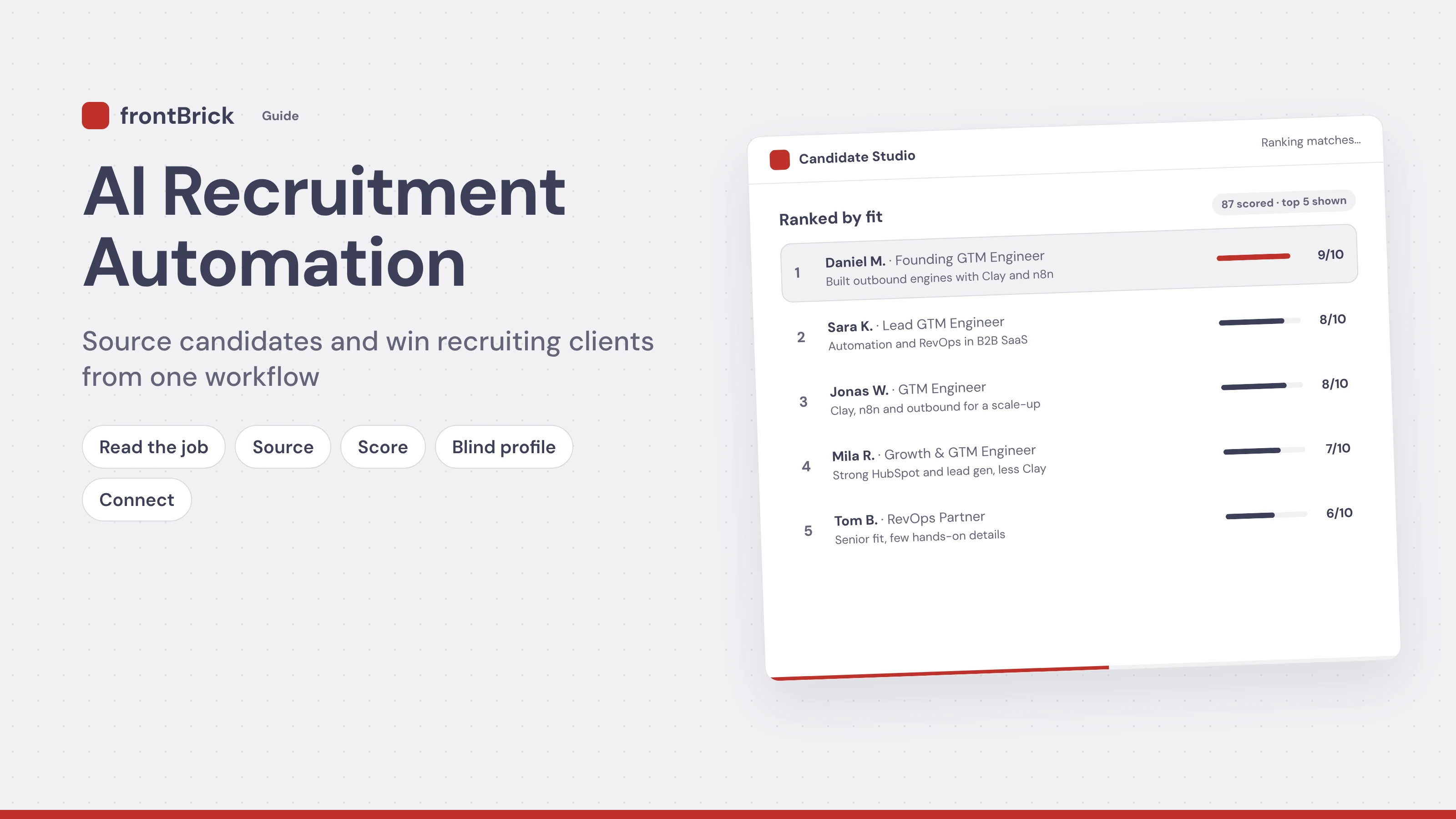
AI recruitment automation is a workflow where AI reads a job post, finds and scores matching candidates, writes a blind profile for the hiring manager, and reaches out on LinkedIn. Done right, the same shortlist does two jobs. It fills the role. And it becomes your best reason to talk to new clients.
Most recruiting teams treat these as two different worlds. One person does candidate sourcing. Someone else does recruitment lead generation and business development. That split wastes time. Every job post you source for is also a sign that a company is hiring. Every strong candidate you find is a door opener with the next company that needs the same skills.
In this guide I walk through the exact 5-step workflow we build for recruitment and staffing agencies at frontBrick, with screenshots of each step. You will see how the AI does each part, what you still control, and how to turn the output into new clients. If you want this built for your agency, see our AI recruitment workflow service.
Key takeaways
What is AI recruitment automation?
Recruitment automation means using software to handle the repeat tasks in hiring. AI recruitment automation adds a layer of judgment on top. Instead of only moving data from A to B, the AI can read a job description, understand what matters, compare it with a profile, and explain its choice in plain words.
Here is what a recruiter usually does by hand for one role:
- Read the job post and write down the must-haves.
- Build Boolean searches on LinkedIn and job boards.
- Open dozens of profiles and judge each one.
- Copy the best ones into a sheet or the ATS.
- Rewrite each resume so the client cannot go around you.
- Write a personal message to each candidate.
Each step is simple. Together they eat most of the week. AI does the same steps in minutes, and it does them the same way every time. The recruiter then reviews the shortlist, makes the calls, and handles the people side.
Recruitment automation vs AI recruiting software
You will see two kinds of products when you look at AI tools for recruitment. The first is all-in-one AI recruiting software. You log in, paste a job, and it gives you candidates from its own database. The second is a custom workflow that connects the tools you already use, like your ATS, LinkedIn, Clay, and your outreach tool.
Neither is always better. If you fill a few roles a month, buy a tool. If sourcing and business development are the core of your agency, a custom workflow usually pays off faster because it fits how you already sell.
Why candidate sourcing and recruitment lead generation belong together
Agencies have two markets. On the supply side are candidates. On the demand side are clients who hire. Most agencies run them with different people, different tools, and different lists.
But look at what the work has in common:
- The trigger is the same. A new job post tells you a company needs someone. That is a sourcing task and a sales lead at the same time.
- The research is the same. To find a GTM Engineer for one SaaS company, you learn which skills are rare, which companies employ them, and who is hiring for them. That is market knowledge your clients pay for.
- The proof is the same. A strong blind profile shows a client you can deliver. It works as a sales asset, not just a delivery step.
This is the same idea we use in B2B buying signals. Hiring for a relevant role is one of the strongest signals there is. For a recruitment agency it is the strongest signal of all, because the company is telling the world exactly what it needs.
The 5-step AI recruitment workflow
Below is the workflow we build for agencies. The screenshots come from our Candidate Studio demo. The candidate names are fictional.
Step 1: The AI reads the job
You paste a LinkedIn job link. The AI opens the post, reads the full description, and pulls out the must-haves as tags. In the example below, that is the role, the location and work type, the core tools like Clay and n8n, the industry, and years of experience.
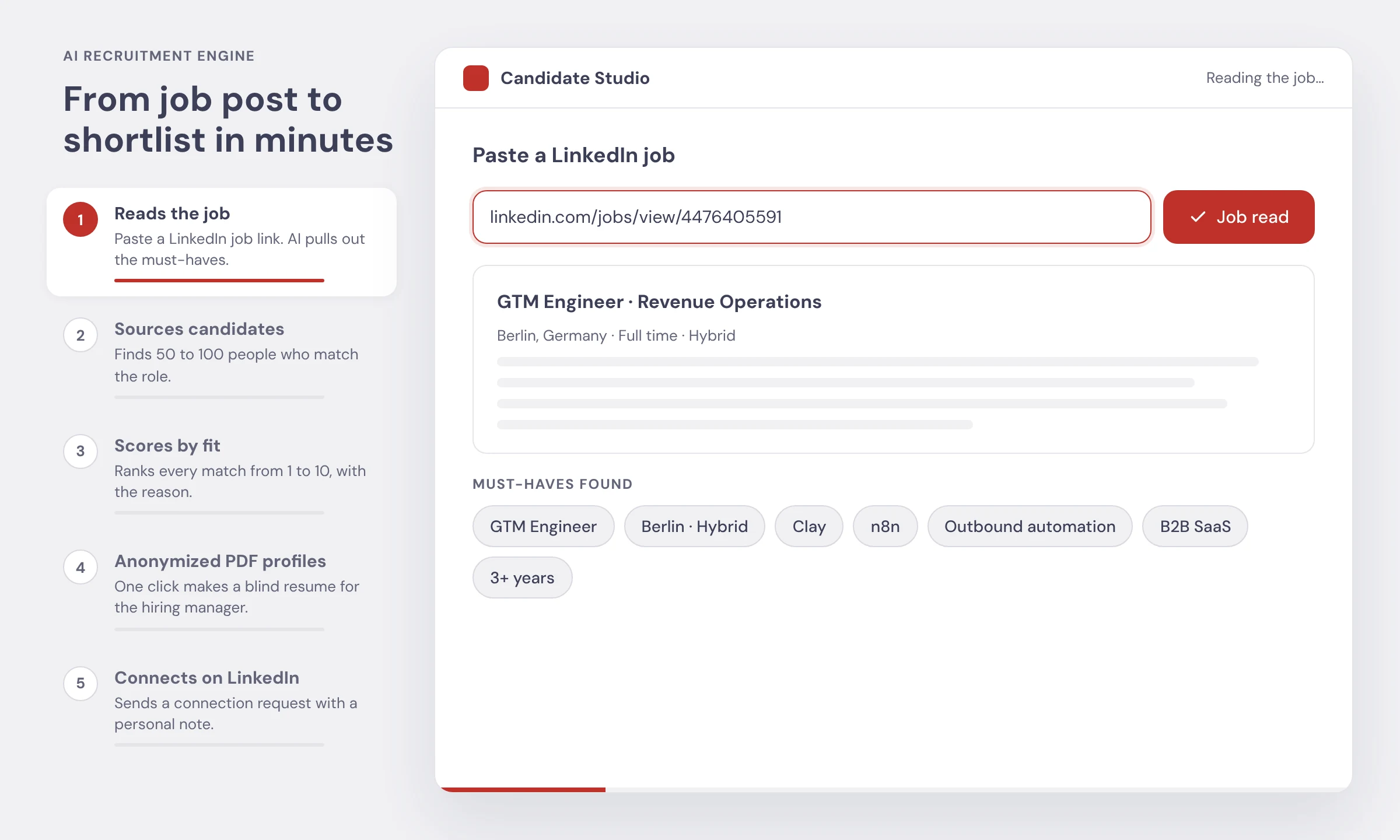
How the AI does it: a language model reads the text and sorts each line into must-have, nice-to-have, or noise. Job posts are full of noise like perks and company history. The model ignores that and keeps what decides fit.
What you control: you can edit the tags before sourcing starts. If the client told you on the intake call that German is a must, add it here. The tags drive everything after this step, so two minutes of checking saves an hour later.
Step 2: The AI sources candidates
With the must-haves set, the workflow searches for people who match. In the demo it finds 87 qualified candidates in about 1 to 2 minutes. For most roles we see 50 to 100 strong matches per search.
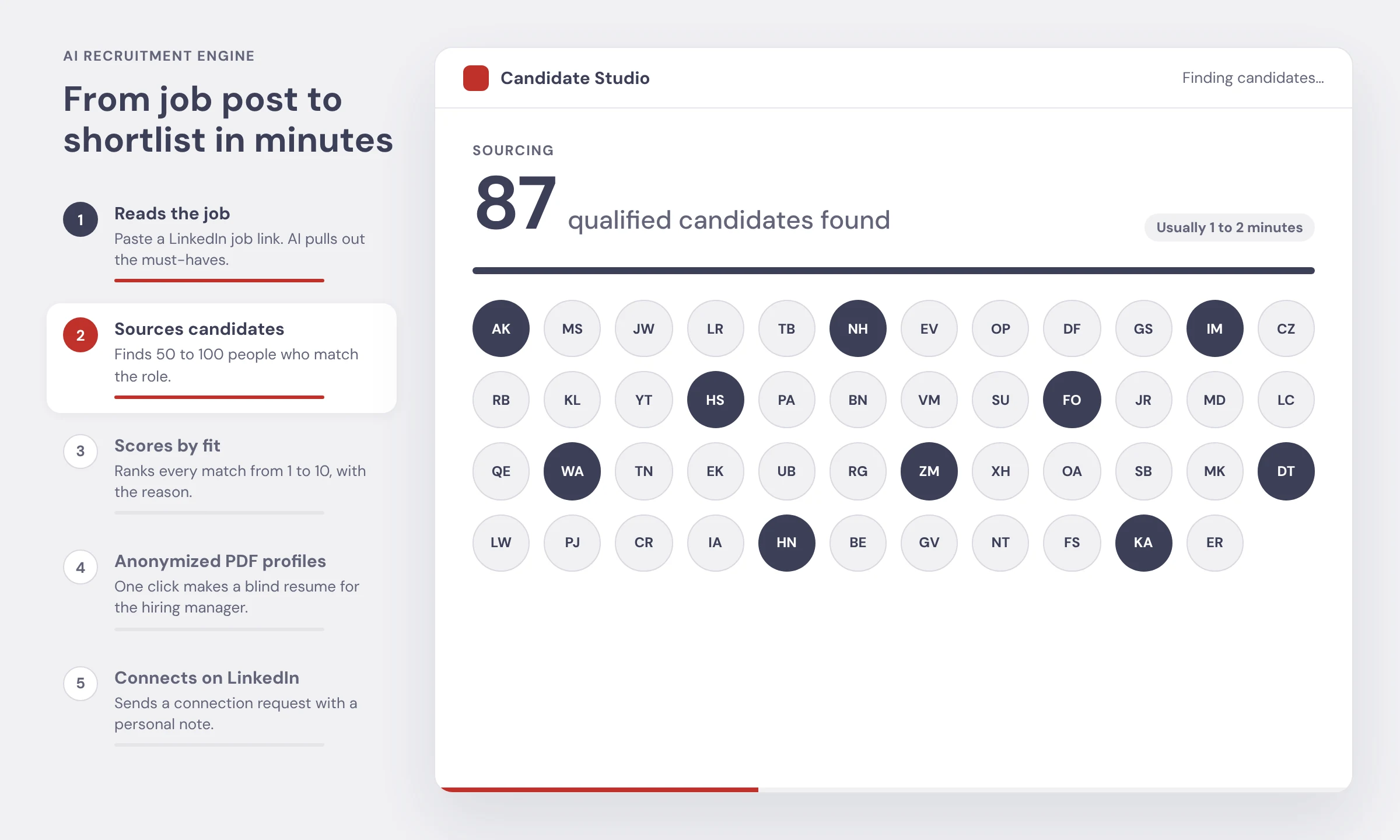
How the AI does it: the tags become searches across people data sources. That can include LinkedIn data, B2B databases, and enrichment tools in Clay. Each profile is then enriched with current title, past roles, skills, and location, so the AI is not judging from a stale headline. This is the same enrichment process we describe in our B2B data enrichment guide.
This is passive candidate sourcing at scale, and it is what most people mean by talent sourcing today. Most of these people are not applying for jobs. They are doing well where they are. That is exactly why they are worth reaching, and why the next steps matter so much.
Step 3: The AI scores every candidate by fit
Finding 87 people is easy. Knowing which 5 to call first is the hard part. The workflow gives every candidate a fit score from 1 to 10, plus a one-line reason.

How the AI does it: the model compares each enriched profile with the must-have tags. It checks for hard requirements first, like location and core tools. Then it weighs softer signals, like company stage or hands-on experience. The reason line is the important part. "Strong HubSpot and lead gen, less Clay" tells you in one glance why Mila is a 7 and not a 9.
What you control: the scoring rules. A 9 for one client might be a 6 for another. We set the weights with your recruiters, then tune them with real feedback. It works a lot like the lead scoring models sales teams use, just pointed at candidates.
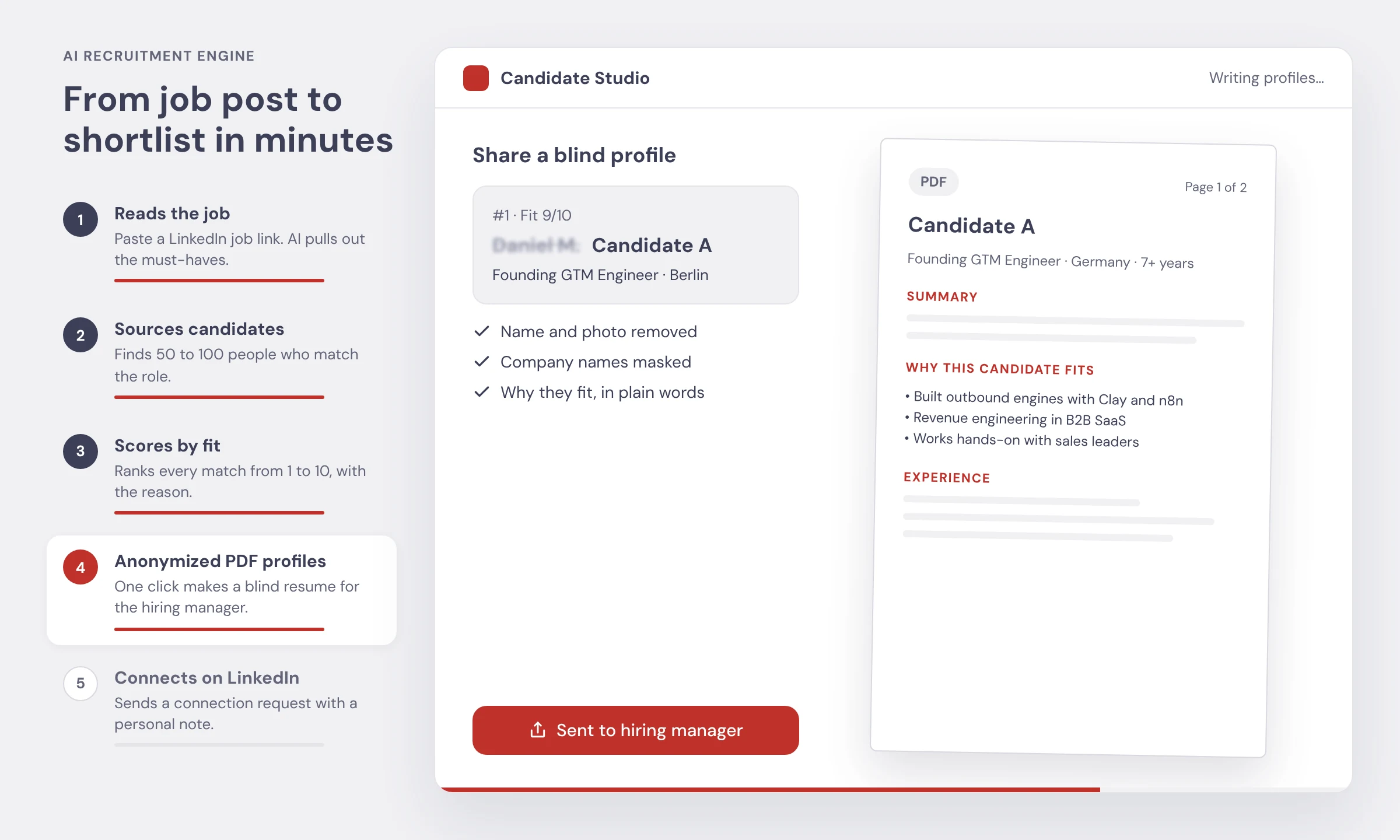
Step 4: The AI writes an anonymized PDF profile
With one click, the top candidate becomes a blind resume. The name and photo are removed, company names are masked, and the AI writes a short section on why this person fits the role. The PDF is then sent to the hiring manager.
Blind profiles solve three problems for agencies:
- They protect your fee. A client cannot look the person up and hire them directly.
- They cut bias. A famous field experiment found that resumes with white-sounding names got 50 percent more callbacks than the same resumes with Black-sounding names. Hiding names in the first review removes that trap.
- They save hours. Reformatting resumes by hand is slow and boring. The AI does it in seconds and in your agency's style.
How the AI does it: it rewrites the profile into a set template, strips anything that identifies the person, and writes the "why this candidate fits" bullets from the scoring step. A recruiter checks the PDF before it goes out.
Step 5: The AI connects on LinkedIn
Last, the workflow sends a LinkedIn connection request with a personal note. The note is written for that one person, based on what they actually built.
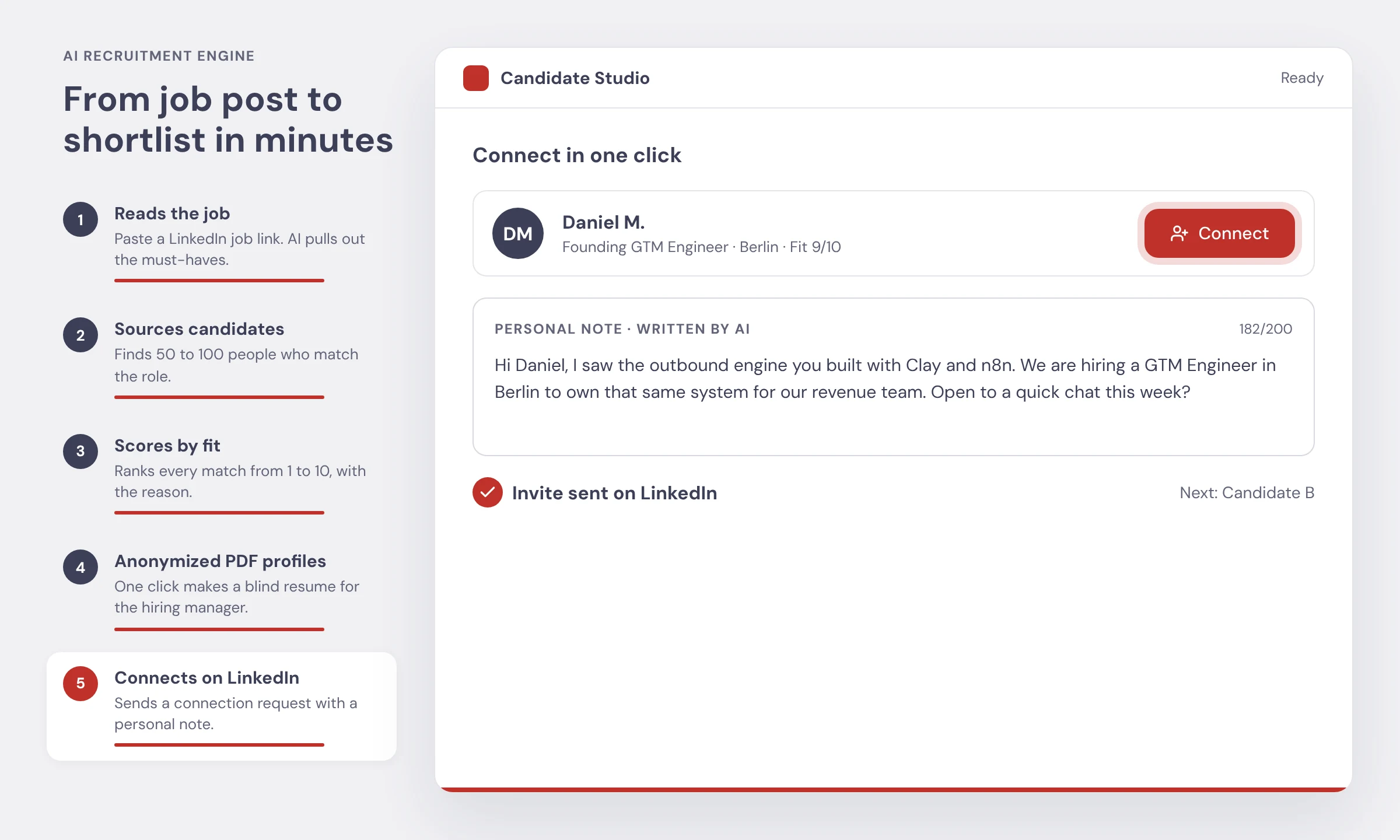
Here is the note from the demo. It is 182 characters, which fits LinkedIn's limit:
It works because it is specific. It names the thing he built, the tools, the city, and asks for something small. Generic notes like "I came across your impressive profile" get ignored.
Mind the limits. LinkedIn caps most accounts at around 100 invitations per week, and invitation notes at 200 characters. Free accounts can only add a note a few times per month, per LinkedIn Help. So the scoring step matters even more. With only 100 invites a week, you want every one going to an 8, 9, or 10. For more on this channel, see our LinkedIn prospecting guide.
How to turn every shortlist into recruitment lead generation
Now the part most agencies miss. The workflow above is built for filling roles. But the same output is your best lead generation for recruitment agencies. If you have ever asked how to get clients for a recruitment agency, or how staffing agencies find clients without cold calling all day, this is the answer we give. Here is how to use it on the demand side.
1. Use job posts as your lead list
A company posting a job has a real, current need. Set the workflow to watch new job posts for the roles you fill, in the regions you serve. Each new post is a lead. These are the best staffing leads you can get, because the need is public and current. You can filter by company size, industry, and how long the job has been open. A job that has been open for 30 days or more is a strong sign the client is struggling to fill it.
If you are building that list from scratch, our guide on how to build a lead list covers the data side, and our ICP guide helps you decide which companies are worth chasing.
2. Reach the hiring manager, not just HR
The person who feels the pain of an empty seat is the hiring manager. For a GTM Engineer role, that is usually the Head of RevOps or the VP of Sales. The workflow can find that person and their verified email from the job post and company data.
3. Lead with a candidate, not a pitch
This is the old "spec CV" or "most placeable candidate" tactic, made fast. Instead of telling a company how great your agency is, show them a person. Run steps 1 to 4 on their job post, then send the blind profile of your top match.
This is outbound recruiting done the right way. It is short, it is about them, and the ask is easy. A yes to "want the other two?" is the start of a client relationship. For more on writing these, see our AI cold email guide and our rules for cold email follow-ups.
4. Reuse the same candidate across similar clients
A great GTM Engineer is useful to more than one company. Once a candidate is scored and profiled, the workflow can match them with every other company hiring for that role. One sourcing effort feeds several sales conversations. That is how sourcing and business development stop being two jobs.
5. Send it through the right channel
Email works well for hiring managers. LinkedIn works well for candidates and for warm follow-up. Before you send cold email at volume, read our email deliverability guide so your emails land in the inbox. If you would rather not run sending yourself, our managed cold email program runs it for you.
Manual vs automated: where the time goes
Here is how one role compares when a recruiter does it by hand versus with the workflow. The manual times are typical ranges recruiters tell us. Your own numbers will vary.
Candidate sourcing tools and AI tools for recruitment
You do not need every tool on the market. Most good setups use a few tools that each do one job well. Here are the main types:
The magic is not in any single tool. It is in how they connect. A candidate scored in Clay should land in your ATS with the reason attached. A client who replies should land in your CRM with the job post linked. That joining work is what we do as a Clay agency and through GTM engineering. If you want to compare outreach tools first, see our cold email tools guide.
Is AI candidate sourcing legal? Compliance and fairness
This is the question every agency asks, and it is the right one. Short answer: AI sourcing can be done legally, but you have to set it up with care. This section is general information, not legal advice.
Keep a human in the loop
The AI suggests. A recruiter decides. In our workflow a person approves the shortlist, checks every blind profile, and owns every message. Scores always come with a reason, so a recruiter can overrule them. This is good practice everywhere and required in some places.
GDPR and candidate data
In the EU and UK, most recruiters source on the basis of legitimate interests. That means you only collect what you need for the role, you keep it secure, and you delete what you do not use. When you collect data from somewhere other than the candidate, Article 14 of the GDPR says you must tell them, usually within one month.
EU AI Act
The EU AI Act treats AI used to screen, rank, or match candidates as high-risk. Agencies that use these tools count as deployers, even when a vendor built the tool. Deployers need human oversight, logging, and clear notice to candidates, as this summary for staffing businesses explains. The original start date for these rules was August 2026. A deal reached in May 2026 moves it to 2 December 2027, according to Gibson Dunn. Check the current status with your lawyer.
New York City Local Law 144
If you hire in New York City and use an automated tool to substantially help with hiring decisions, Local Law 144 requires a yearly bias audit, a public summary of the results, and notice to candidates. A 2025 state audit found enforcement has been weak so far, but the rules still apply.
Respect platform rules
Stay well under LinkedIn's weekly invite limit, avoid sending the same note to everyone, and warm up new accounts slowly. Getting an account restricted costs far more than sending a few fewer invites.
Common mistakes with recruitment automation
- Skipping the intake call. AI can only read what the job post says. The real must-haves often come from talking to the hiring manager.
- Trusting scores without reasons. If you cannot see why someone is a 9, you cannot catch a bad 9.
- Blasting every match. 87 matches does not mean 87 messages. Contact the top 10 to 20 first.
- Generic outreach. A note that could go to anyone gets ignored by everyone.
- Forgetting the client side. If your workflow only fills roles, you are leaving your best lead source unused.
- Leaving data in a side tool. If candidates never reach your ATS, your team will not trust or use the system.
How frontBrick builds this for recruitment agencies
We build this workflow as a custom AI tool for recruitment and staffing agencies. It is part of our AI recruitment workflow service. We do not sell you a login to someone else's database. We build the system around your niche, your scoring rules, your ATS, and your outreach, then hand it over working.
Here is what you get:
- Job reading and tagging tuned to the roles you fill most.
- Automated candidate sourcing across the data sources that fit your niche.
- Fit scoring with reasons, using weights set with your recruiters.
- Blind PDF profiles in your agency's style, ready for clients.
- LinkedIn and email outreach to candidates and hiring managers, within safe limits.
- Client lead generation from new job posts, so every shortlist can open a new account.
- ATS and CRM sync, so your team works where it already works.
We are a Clay partner and an AI-native GTM agency, so this is the same kind of system we build for B2B sales teams, pointed at hiring. If you want to see it running on one of your real open roles, book a call and bring a job link.
Frequently asked questions
What is recruitment automation?
Recruitment automation is using software and AI to do the repeat work of hiring for you. That means reading job posts, sourcing candidates, scoring them against the role, writing profiles, and sending outreach. The recruiter still makes the final calls. The software just removes the busywork.
How does AI source candidates?
The AI reads the job and turns it into a list of must-haves, like skills, tools, location, and years of experience. It then searches people databases and LinkedIn data for profiles that match. Each match gets a fit score from 1 to 10 with a short reason, so the recruiter only reviews the best ones.
What are the best AI tools for recruitment?
It depends on the job. LinkedIn Recruiter and people databases help you find profiles. Clay is strong for enrichment and scoring. n8n or Make connect the steps. HeyReach or Aimfox send LinkedIn outreach, and your ATS stores the result. Many agencies get the most value from a custom workflow that joins these tools, instead of one more standalone app.
Can AI replace recruiters?
No. AI is good at reading, searching, sorting, and drafting. It is not good at judging culture fit, closing a nervous candidate, or managing a hiring manager. The best setup lets AI do the first 80 percent of research so recruiters spend their time on calls and relationships.
How do recruitment agencies get clients?
The fastest way is to lead with candidates. Find companies that are hiring for roles you fill, source two or three strong matches, and send the hiring manager a blind profile of the best one. A real candidate is a much better opener than a generic pitch about your agency.
How do staffing agencies find clients?
Most staffing agencies find clients through job post signals, referrals, LinkedIn, and cold email. Job posts are the best signal because they show a company has an open need right now. An automated workflow can watch new job posts every day and alert you when a target company starts hiring.
What is passive candidate sourcing?
Passive candidate sourcing means finding people who are not applying for jobs but might move for the right offer. Most strong candidates are passive. You reach them through LinkedIn, email, and referrals, with a short personal note that shows why the role fits them.
What is a blind or anonymized resume?
A blind resume hides the candidate's name, photo, and past company names. It keeps the skills, experience, and the reasons they fit. Agencies use blind profiles to share talent with clients safely and to cut bias in the first review.
Is AI candidate sourcing legal under GDPR?
It can be, if you do it carefully. In the EU and UK most recruiters rely on legitimate interest, only collect data they need, and tell candidates how they got their data within one month. Ranking tools may also count as high-risk under the EU AI Act. Talk to a lawyer about your setup. This guide is not legal advice.
How many LinkedIn connection requests can I send per week?
LinkedIn does not publish an exact number, but most accounts are capped at around 100 invitations per week. New accounts should start lower. Notes on invitations are limited to 200 characters, and free accounts can only add a note a few times per month.
Does AI recruitment automation work with my ATS?
Usually yes. Most ATS tools like Bullhorn, Recruitee, Greenhouse, and Lever have APIs or Zapier and n8n connectors. A custom workflow can push scored candidates, blind profiles, and outreach status straight into your ATS so your team works where they already work.
How long does it take to set up?
A focused first version usually takes a few weeks. That covers job reading, sourcing, scoring, blind profiles, and LinkedIn outreach for your main roles. You then improve the scoring rules with real feedback from recruiters and clients.
How much does AI recruitment automation cost?
Off-the-shelf AI recruiting software is usually priced per seat or per role. A custom workflow has a build cost plus data and tool costs that grow with volume. The right choice depends on how many roles you fill and how unique your process is.
Want this workflow built for your agency?
Send us one live job you are working on. We will show you the must-haves the AI pulls out, how many qualified people it finds, and which companies are hiring for the same role right now. Book a call here, or read more about our AI recruitment workflow.
Book Your Strategy Call Today
Want to see how frontBrick can help you generate qualified leads and fill your pipeline fast? Book your free strategy call now.
Book Strategy Call

