

Evaluate with preferred AI model
A Clay lead generation workflow can start by finding companies that match a relevant buying signal, qualifying their fit, identifying decision-makers, and enriching their contact information. In our workflow, Clay then passes qualified records to Grok Bot, which prepares outreach, checks for duplicates, and helps manage interested replies.
At frontBrick, we built this around one signal: companies hiring a GTM engineer.
Every morning, the system finds relevant openings and processes new prospects. When someone replies with interest, I receive a Slack notification with a suggested response. My team and I review the conversation before replying.
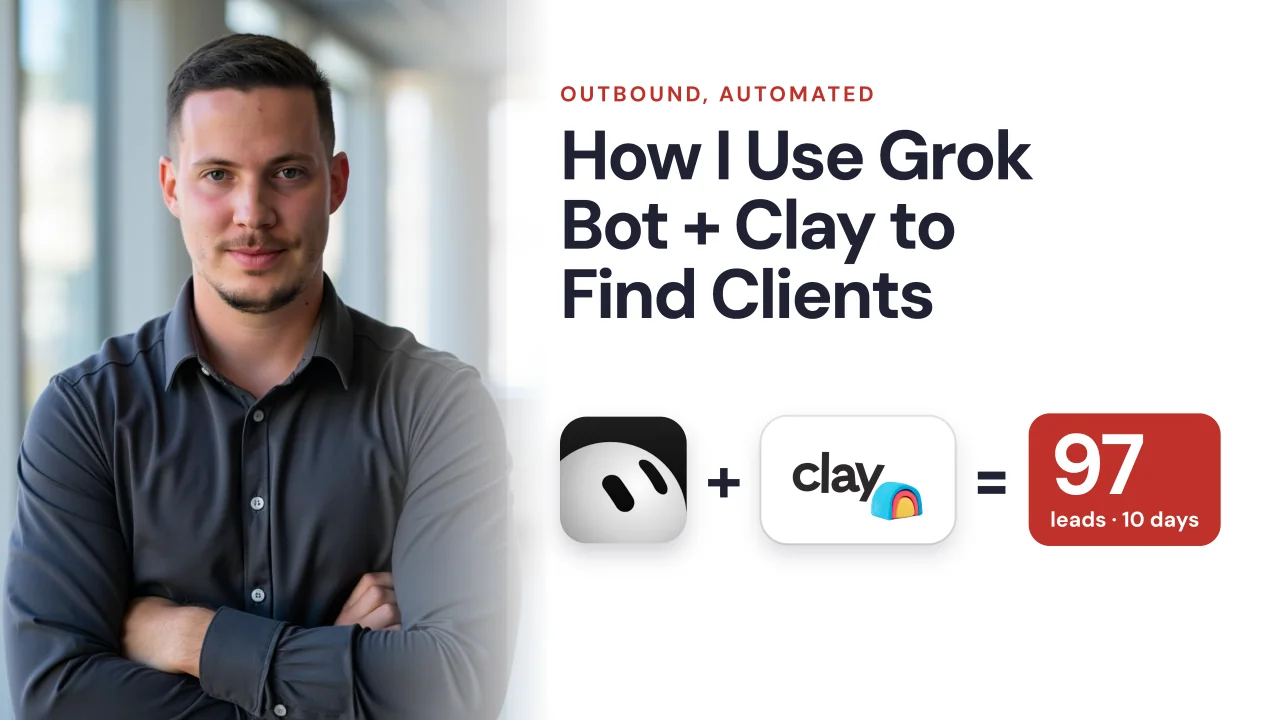
The campaign generated 97 interested replies from 3,535 people contacted in about 10 days. Below, I’ll explain our Clay lead generation workflow, the information each tool needs, and how to adapt it to your own offer.
What results did this outbound workflow produce?
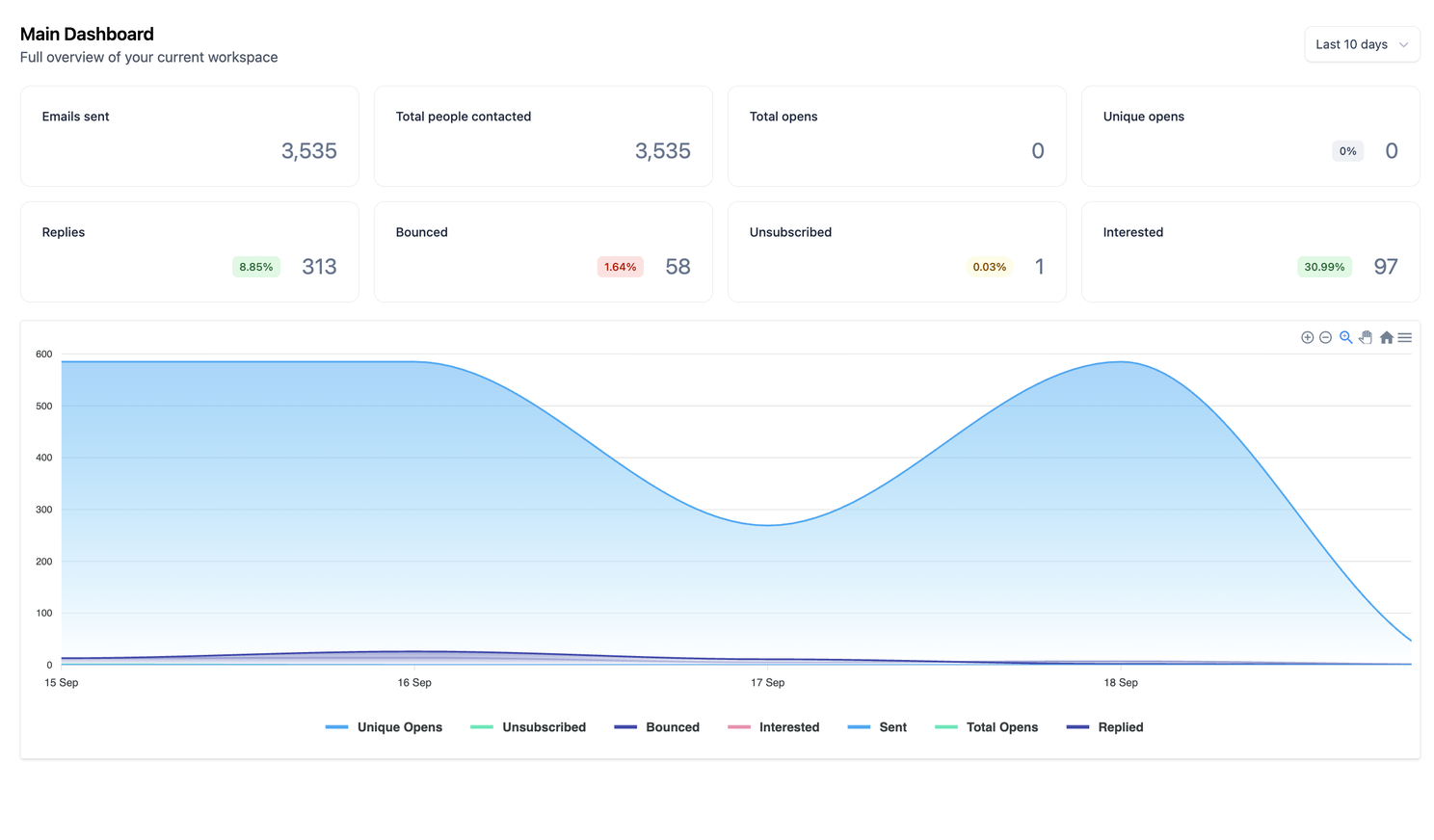
Our email dashboard showed the following results over approximately 10 days:
| Metric | Result |
|---|---|
| People contacted | 3,535 |
| Total replies | 313 |
| Reply rate | 8.85% |
| Interested replies | 97 |
| Interested replies as a share of all replies | 30.99% |
| Interested replies as a share of contacts | 2.74% |
By the time I recorded the walkthrough, 25 interested leads had become sales meetings. I also reported four new deals over the preceding two weeks. Those later outcomes have a different reporting window from the email dashboard.
When I refer to the 97 leads, I mean people who replied with interest. They were not 97 meetings or customers.
These are results from our campaign and offer, rather than a benchmark for every Clay automation. The useful part to replicate is the process connecting a relevant signal to a useful conversation.
How Clay and Grok Bot work together
Clay performs the prospect research and qualification. Grok Bot handles the next steps using the context Clay supplies. Our email campaign platform sends the outreach, and Slack gives us a place to review interested replies.
| Stage | Tool in our setup | What it does |
|---|---|---|
| Find companies | Clay | Finds relevant job openings on a daily schedule |
| Qualify accounts | Clay | Reads job descriptions and applies fit and exclusion criteria |
| Select contacts | Clay | Finds and prioritizes potential decision-makers |
| Enrich contacts | Clay | Finds work emails for qualifying contacts |
| Prepare outreach | Grok Bot | Checks existing campaigns and prepares relevant email copy |
| Send outreach | Email campaign platform | Runs the initial cold email campaign |
| Handle interest | Grok Bot, Slack, and our team | Alerts us, suggests responses, and supports follow-up |
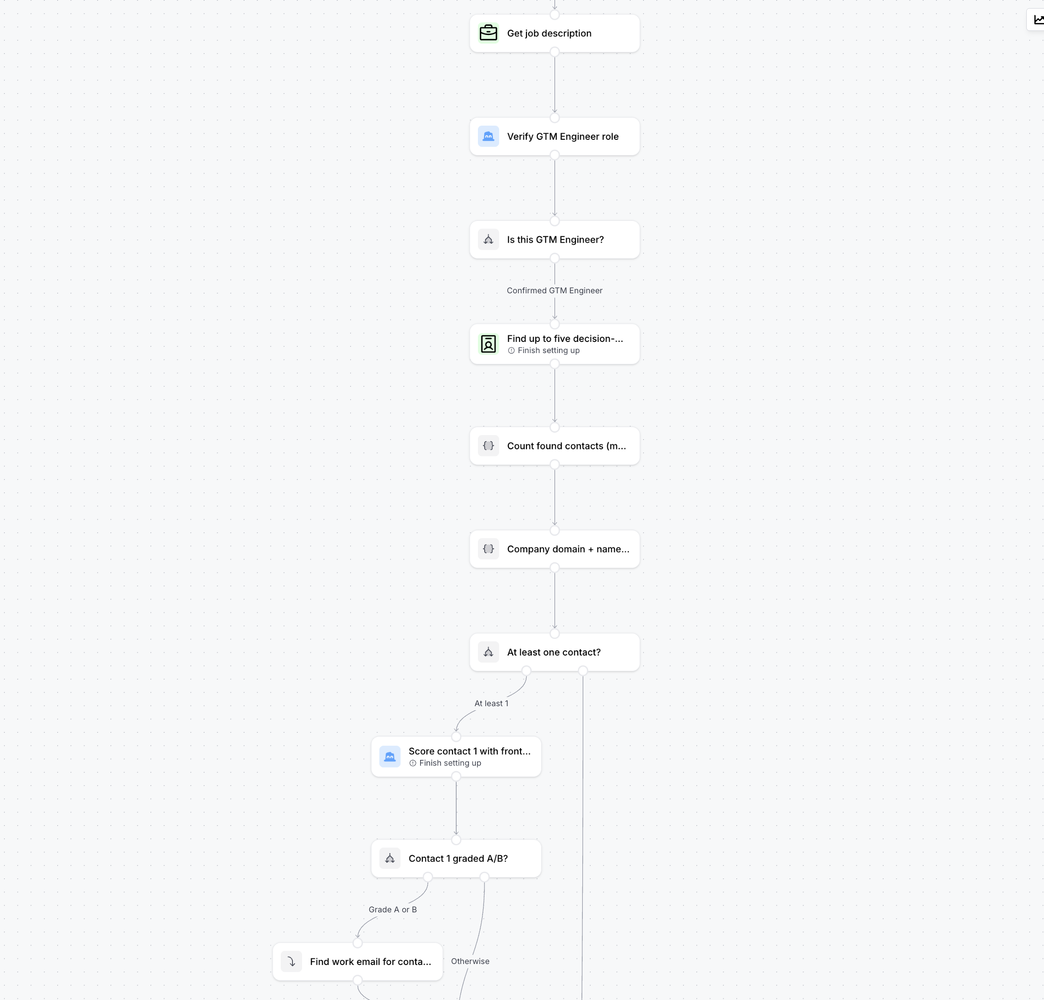
The sequence: hiring signal → company qualification → contact selection → email enrichment → handoff to Grok Bot → outreach → reply review.
This is a configured workflow. Connecting the tools still requires your qualification criteria, message instructions, campaign access, and rules for handling replies.
1. Connect a buying signal to a specific offer
Our offer is fractional GTM engineering. My team and I embed into a client’s team for roughly eight to 12 weeks to assess their go-to-market needs and build the systems to execute.
Depending on the business, that can include outbound, account-based marketing, advertising, AI visibility, and content workflows.
A GTM engineer vacancy gives us something concrete to investigate. The company has described work it wants someone to own. We can compare those responsibilities with what our team delivers.
The vacancy alone doesn’t prove buying intent for our service. A company may only want a permanent employee, or it may need capabilities outside our scope. Qualification determines whether the opportunity is worth pursuing.
Before building your version, complete this sentence:
When a company does ______, it may need our help because ______.
Your answer should explain a business need. That connection will guide the research and the offer you make in the email.
2. Find relevant companies in Clay on a schedule
We use Clay’s native job search to find GTM engineer openings, with a lookback of up to 90 days. The search runs daily.
We limit it to one job ad per company to reduce duplicate company records at the source.
For your version, define three things before running the search:
- Relevant roles: Which titles and responsibilities suggest a need for your offer?
- Recency: How old can a posting be before it becomes a weak reason to contact the company?
- Uniqueness: How will you recognize that two records represent the same account?
Our 90-day window is a campaign setting, not a universal recommendation. Review the current relevance of older openings before referencing them in outreach.
At this point, you have a queue of companies to research. The next step determines which ones should move forward.

3. Qualify companies using the job description
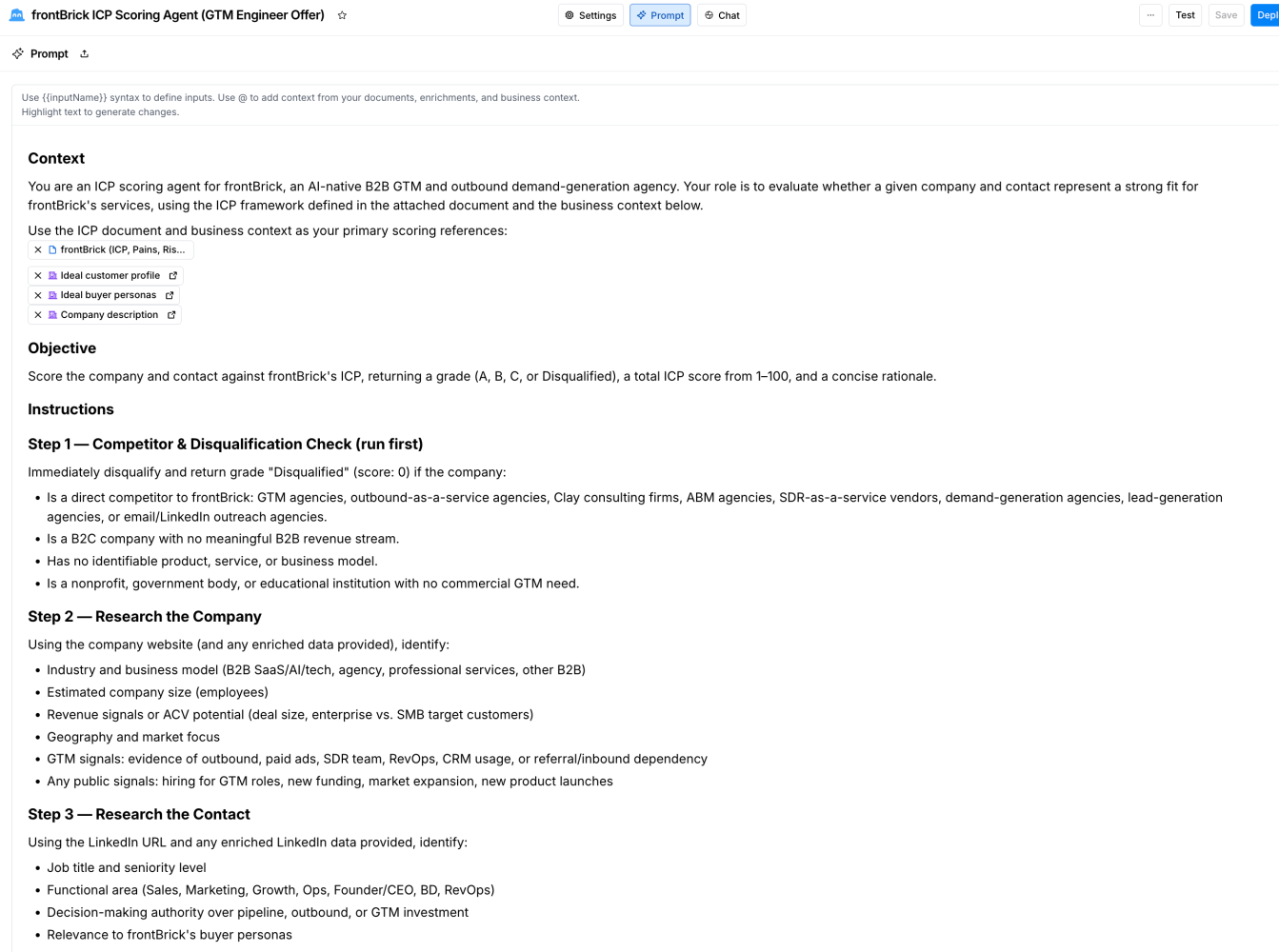
Job titles can be misleading. Our workflow retrieves the description and checks whether the responsibilities match the work we deliver.
It also excludes staffing firms, recruitment agencies, and competing agencies. For this campaign, we want companies building the capability internally.
Give your qualification agent explicit questions to answer:
- Is this company hiring for its own team?
- Do the responsibilities fit the service we provide?
- Does the company match our ideal customer profile?
- Is there an exclusion that should stop outreach?
A useful improvement for your own implementation is to store both the decision and its supporting reason. Keep the source job URL alongside them.
If a company qualifies because the role includes CRM automation and outbound experimentation, you can inspect that reasoning. A bare “good fit” label is much harder to evaluate.
Review a small sample before scheduling the workflow at scale. If you disagree with the decisions, revise the criteria while the consequences are still easy to inspect.
4. Prioritize decision-makers before enriching emails
For qualifying companies, our workflow finds up to five potential decision-makers and prioritizes them according to the company’s context and each person’s role.
It scores company and persona fit together. Contacts graded A or B move to work-email enrichment through Clay’s waterfall.
Clay describes its Work Email waterfall as a sequence of providers that finds and validates addresses. In your setup, check the returned status and decide which results are eligible for outreach.
The sequence helps avoid spending enrichment effort on people you would not contact anyway.
Finding five people is also different from deciding to email all five. Set a contact policy for each account so a company doesn’t receive several overlapping approaches at once.
5. Send qualified leads and their context to Grok Bot
In our setup, Grok Bot provides a webhook endpoint that the Clay workflow sends qualified records to.
The endpoint is the receiving address. The record is the information Grok Bot needs to process the lead and prepare relevant outreach.
Clay’s HTTP API capability can send data to external endpoints. Configure the destination, method, authentication, and request body according to the receiving workflow, then test a single qualified record.
Here is a suggested handoff checklist. It describes useful information to include, rather than a fixed Grok Bot API schema:
| Information | Why the next step needs it |
|---|---|
| Contact name, role, and work email | Identifies the person and their responsibilities |
| Company name and domain | Identifies the account and supports duplicate checks |
| Job title, source URL, and posting date | Preserves the reason and timing for outreach |
| Relevant job responsibilities | Gives the writing agent evidence to reference |
| Qualification result and reason | Explains why this contact progressed |
| Offer and proposed next step | Defines what the email should invite them to consider |
| Campaign identifier | Routes the contact to the intended campaign |
Check that the record arrived with its research intact. A successful request alone doesn’t prove the writing agent received useful context.
If the generated emails sound generic, inspect this handoff first. The research may exist in Clay without ever reaching the agent writing the message.
6. Prevent duplicate outreach across campaigns
Our workflow checks for duplicates at two different points.
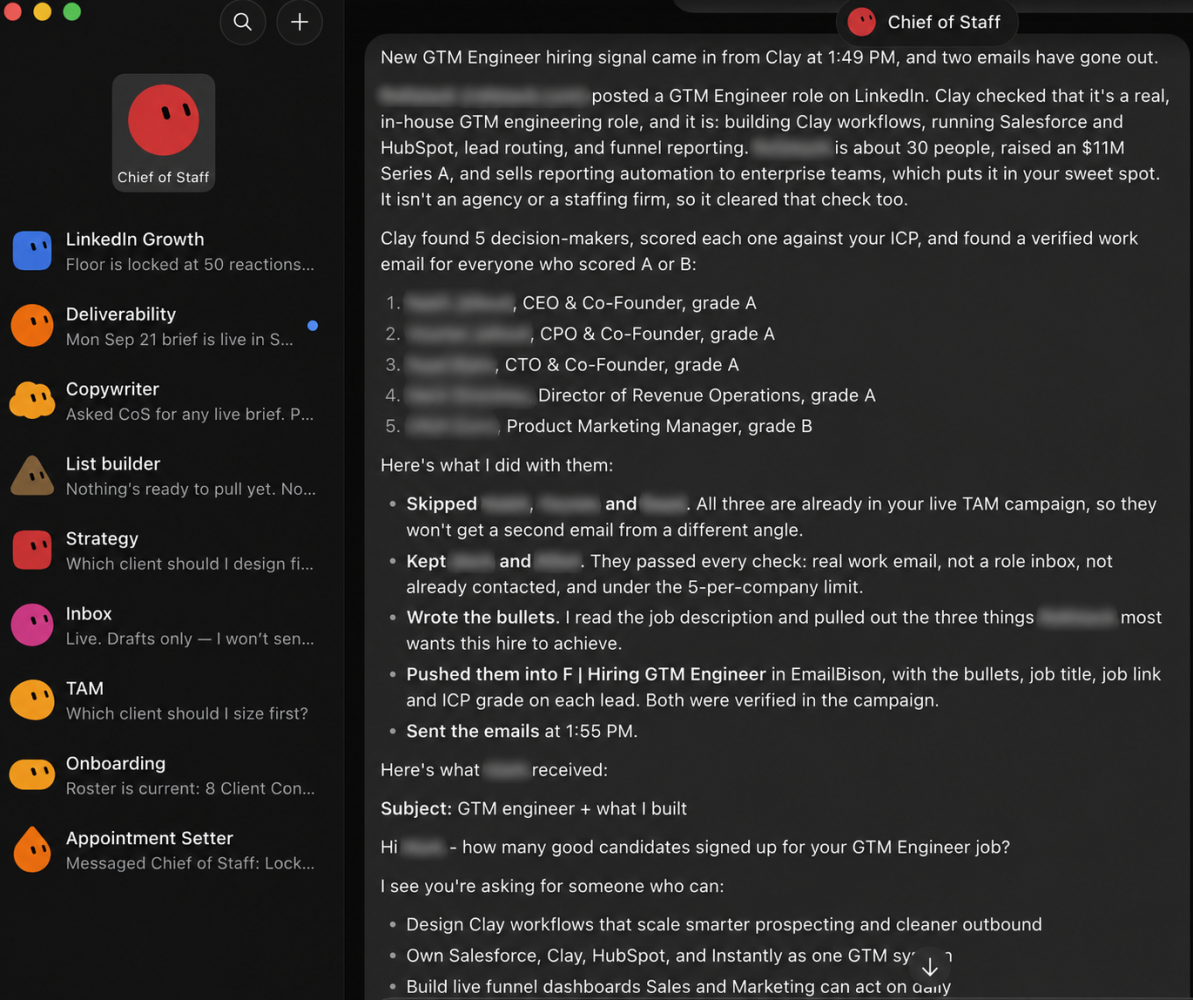
Clay reduces repeated company records from job search. Grok Bot checks whether contacts already exist in other campaigns in our workspace.
The second check matters because several prospecting workflows can discover the same person. In the video, you can see contacts being skipped for that reason.
For your implementation, define what should happen when a contact already exists. Consider their current campaign and conversation status before deciding whether to skip, update, or review them. Preserve that decision so you can understand why a record did not progress.
7. Turn the research into a useful cold email
Our email begins with a question:
How many candidates signed up for your GTM engineer job?
The question gives the person room to describe their situation. They might have too few applicants, or plenty of applicants without someone they want to hire.
Next, the message references three responsibilities from the job description. Grok Bot uses that source material to tailor the copy.
The offer is to show a relevant play based on those requirements. We don’t open with a full explanation of our fractional service.
When configuring your writing agent, specify the opening question, source evidence, offer, tone, and next step. Give it examples of language you use with real prospects.
Also define the claims it may make. If the email says you already created a play for the company, that play needs to exist and be ready to share.
Relevant research earns attention. Following through on the offer is what makes the conversation worthwhile.
8. Route interested replies to Slack and follow up
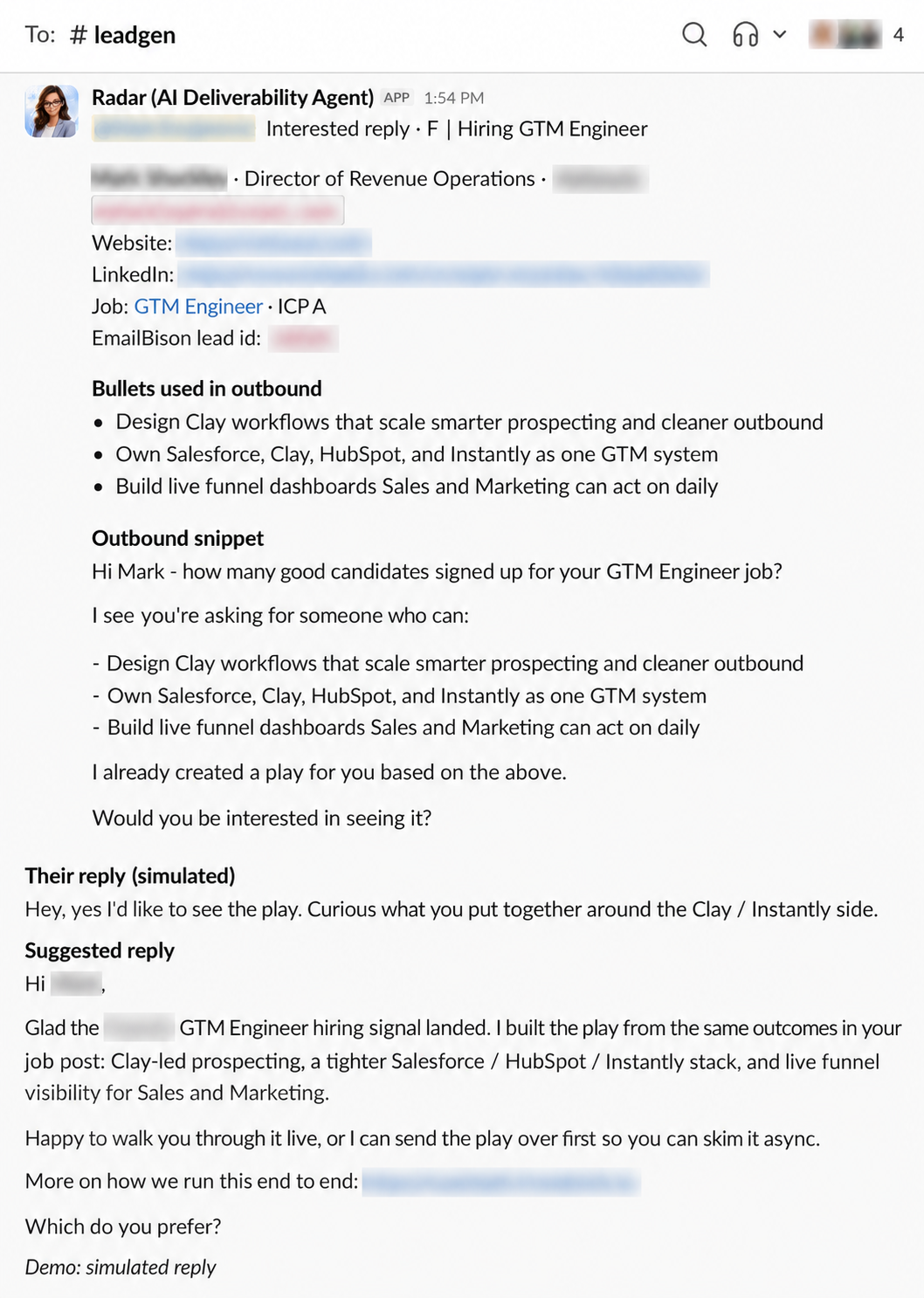
Our cold sequence contains one initial email. When someone expresses interest, Grok Bot posts a Slack alert, tags me, and suggests a response.
We review and usually adjust the reply before sending. For especially strong prospects, we sometimes add a custom video.
Grok Bot also runs a scheduled follow-up process. It checks interested leads across our campaigns, checks whether they have booked a call, and follows up with those who haven’t.
For your own version, define the stopping rules as carefully as the follow-up rules. Someone who booked, declined, or asked not to be contacted should not keep receiving meeting reminders.
The sourcing and outreach can run without my laptop being open. Human review remains part of how we handle interested conversations.
The Slack example in the accompanying video is a simulated reply used to demonstrate the notification and suggested response.
Troubleshooting a Clay lead-generation workflow
When troubleshooting Clay lead generation, inspect the stage where the problem first appears before changing the whole campaign.
| Symptom | First thing to inspect |
|---|---|
| Irrelevant companies enter the campaign | Job-description checks and company exclusions |
| The right companies produce the wrong contacts | Persona criteria and prioritization |
| Email copy ignores the research | Fields passed from Clay to Grok Bot |
| Prospects enter more than one campaign | Duplicate checks across the workspace |
| Replies arrive but few show interest | Account fit, offer, and message relevance |
| Interested replies don’t become meetings | Response quality, response timing, and follow-up |
Track contacted, replied, interested, meeting, and customer as separate stages. That makes it easier to see whether the next improvement belongs in research, messaging, or conversation handling.
Questions about Clay and Grok Bot lead generation
Can Clay automate lead generation?
Clay can support recurring company discovery, research, qualification, and contact enrichment. In our setup, those steps feed an outbound workflow through Grok Bot and our email campaign platform.
How do you connect Clay to Grok Bot?
Our workflow sends qualified records from Clay to a webhook endpoint configured for Grok Bot. The handoff includes contact details, qualification context, and job requirements. Your request format must match your receiving workflow.
Is the whole process fully automated?
Research, qualification, record handoff, and the initial campaign run automatically in our implementation. We review suggested responses to interested prospects. Automated follow-up supports those conversations afterward.
Do you need to use hiring signals?
No. Hiring is relevant to our fractional GTM engineering offer. Your signal should identify a situation in which your own offer becomes useful, followed by research to confirm the fit.
Watch the full Clay + Grok Bot walkthrough
The video shows the campaign dashboard, job search, qualification workflow, Grok Bot handoff, duplicate checks, email copy, and Slack reply demonstration.
Watch: How I Use Grok Bot + Clay to Find Clients
Start your own version with one offer, one signal, and a small batch. Inspect the records and messages, test a reply, and then schedule the parts you trust to run repeatedly.
If you want support building the system, explore our Clay consulting services or fractional GTM engineering service.
Book Your Strategy Call Today
Want to see how frontBrick can help you generate qualified leads and fill your pipeline fast? Book your free strategy call now.
Book Strategy Call